Home › UK passport photo

Checked against every GOV.UK rule

UK passport photos, taken at home.

Take it on your phone. We check it against every GOV.UK rule, then give you the digital photo for an online application and 35 × 45 mm prints for the post. Free to check, $4.99 to download.

or drop a photo anywhere on this page

  • Checked on your phone
  • Online or by post
  • No photo code needed
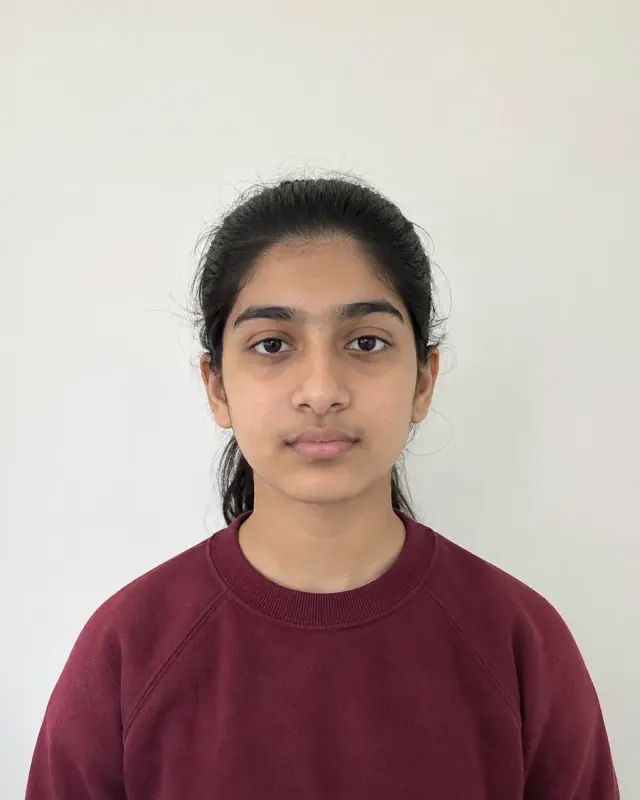
Teenage girl in a burgundy jumper against a plain light wall, cropped to 35 × 45 mmHead 29–34 mm
UK Passport35 × 45 mm

Checked for a UK passport

  • Head 29–34 mm, chin to crown
  • Plain light grey or cream behind you
  • Neutral expression, mouth closed
  • Eyes open, glasses only if you must
  • Facing forward, nobody else in it

Example photo, AI-generated.

Online or by post?

Two ways to apply, two different photos.

GOV.UK wants a different photo for each. You get both from one picture, so you don’t have to decide before you take it.

Teenage girl in a burgundy jumper, uncropped: head, shoulders and upper bodyGOV.UK crops it

Applying onlineDigital photo

  • At least 600 × 750 pixels, 50 KB to 10 MB
  • Head, shoulders and upper body. Don’t crop it: GOV.UK does
  • A plain, light-coloured background that stands out from you
  • No photo code needed: you upload the file we give you
Two identical 35 × 45 mm prints

Applying by post2 prints

  • 45 mm high, 35 mm wide, head 29 to 34 mm
  • A plain cream or light grey background
  • Two identical colour prints on plain white photo paper, no border. Order them from a photo lab
  • First passport? Your countersignatory signs the back of one

UK passport photo requirements

Every GOV.UK rule, and what we check.

Most of these are checked on your photo before you pay. The one we can’t check is when it was taken.

RuleGOV.UK saysWhat we check
Size45 mm high, 35 mm wide; 29–34 mm from chin to the top of the headCheckedCropped to fit from the top of your head and your chin
BackgroundPlain cream or light grey (prints); plain and light, in contrast with you (digital)CheckedColour, shadows, patterns and anything behind you
ExpressionNeutral, mouth closedCheckedSmiles and an open mouth
EyesOpen and visible; no hair over themCheckedClosed eyes
GlassesOnly if you have to wear them: no tinted lenses, no frames or glare over your eyesCheckedGlasses, so you can take them off
PoseFacing forward, looking straight at the camera; nobody else in the photoCheckedTilt, turn, and other people or hands in the frame
Unedited“Unaltered by computer software”Our promiseWe never change it, unless you choose to replace the background
How recentTaken in the last monthUp to youWe can’t tell when a photo was taken

From GOV.UK, checked November 2026. The passport office always makes the final call. Compare every passport photo size.

Children and babies

Easier rules for little ones.

GOV.UK relaxes a few rules for young children. Tell us the photo is of a child or a baby and we check against those instead.

Under 6

They don’t need a neutral expression or to look straight at the camera.

Under 1

Their eyes can be closed. You can support their head, as long as your hand doesn’t show.

Babies

Lay them on a plain, light sheet and take the photo from above.

Taking a baby’s photo? How to take it at home, step by step.

Questions

Good to know.

Can I take my own UK passport photo?

Yes. For an online application you upload a photo taken on a phone or camera, and it’s easier if someone else takes it. Stand in front of a plain, light wall, face the camera and keep a neutral expression. We check it against every rule before you pay.

What size is a UK passport photo?

A printed photo is 45 mm high and 35 mm wide, with 29 to 34 mm from your chin to the top of your head. A digital photo for an online application must be at least 600 × 750 pixels and between 50 KB and 10 MB, and you shouldn’t crop it: GOV.UK crops it for you.

Do I need a photo code to apply online?

No. A code is how a photo booth or shop sends GOV.UK their photo. If you take your own, you upload the file instead. We give you that file, uncropped as GOV.UK asks, once it’s checked.

What background does a UK passport photo need?

Printed photos need a plain cream or light grey background. A digital photo needs a plain, light-coloured background that stands out from you. Either way, no patterns, objects or shadows.

Can I wear glasses or smile?

GOV.UK asks you not to wear glasses unless you have to. If you do, no tinted lenses, and no frames or glare over your eyes. Keep a neutral expression with your mouth closed. Children under 6 don’t have to.

How recent does my photo have to be?

It must have been taken in the last month. That’s stricter than the US, Australia and New Zealand, which allow six months.

Can I edit my UK passport photo?

No. GOV.UK says it must be “unaltered by computer software”. We never change your photo unless you choose to replace the background, and we tell you first that it may be rejected.

Your UK passport photo, tonight.

Free to check. $4.99 to download both the digital photo and the prints.

Take my photoUpload my photo
Young man laughing, holding up his passport